




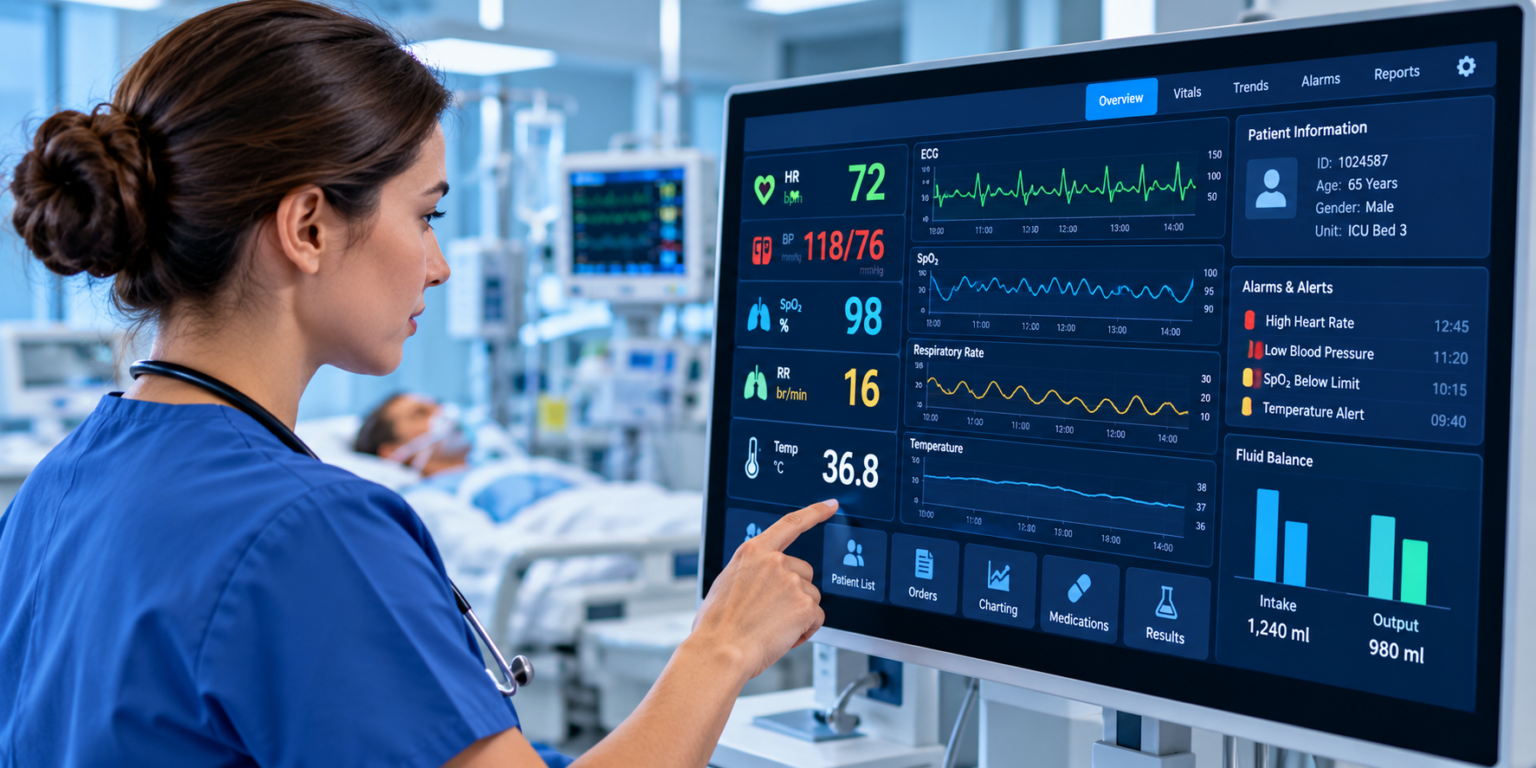
The Capsule Technologies ICU dashboard, now part of Philips Capsule, brings the live data from every machine around a critical care bed onto one screen, then watches that data for early signs of trouble. It works in two layers. The Medical Device Information Platform, known as MDIP, connects to the bedside devices and collects their data. Capsule Surveillance reads that data as it streams in and sends focused alerts to the right clinician. Together they give a care team a single, real-time view of every patient they are responsible for, plus a warning when something starts to go wrong.
This matters most in the ICU, where one patient can be wired to a ventilator, an infusion pump, a bedside monitor, and more, each with its own screen and its own alarm. Watching all of those separately is how small changes get missed. The dashboard pulls everything into one place so a team can see the whole patient at a glance. Here is what it does and the features that make it useful at the bedside.
What the Capsule Technologies ICU dashboard is
Capsule Technologies started in 1997 and was bought by Philips in 2021, so you will often see the product called Philips Capsule today. The core idea has stayed the same. It is a vendor-neutral platform, which means it is built to work with almost any brand of medical device rather than tying a hospital to one maker.
The dashboard sits on top of two building blocks. MDIP handles the plumbing. It captures data from the devices and turns it into a clean, unified stream. Capsule Surveillance is the smart layer on top, reading that stream and flagging patterns that need attention. More than 2,800 hospitals and health systems use Capsule for this kind of device connection, which gives you a sense of how widely the approach has been tested in real wards. The same platform is used well beyond the ICU too, across general care, operating rooms, and virtual care settings, so a hospital can run one system instead of a different tool in every unit.
One screen for every connected device
The first job of the dashboard is integration, and this is where much of the value sits. MDIP connects to more than 1,200 device models from over 100 manufacturers. That covers ventilators, patient monitors, infusion pumps, and specialty gear across the hospital.
Behind the scenes, a driver library translates each device’s output into a common format, so a ventilator from one company and a monitor from another show up in the same clean view. The platform captures full waveforms, not just single numbers, which means the dashboard can show the shape of a heartbeat or a breath rather than a lone reading. That extra detail helps a clinician tell a real change from a blip. Capsule Neuron acts as the connection point at or near the bedside that gathers the device data, while Capsule Vitals Stream moves those readings on to where they are needed. The result is a near-real-time, unified picture of the patient that does not depend on which brands the hospital happens to own.
Raw device output on its own is just a flood of numbers. The value comes from turning that stream into context, so a reading arrives tagged to the right patient, the right bed, and the right moment in time. That is what lets the dashboard present live data as something a clinician can act on rather than a log to sort through later, and it is the base every alert and report is built on.
Key point: the vendor-neutral design is the feature that makes everything else possible. Because the dashboard speaks to nearly any device, a hospital can add it without replacing equipment it already runs.
A live view of every patient at once
Once the data is flowing, the dashboard gives clinicians a centralized view of ventilator and monitor data for the patients in their care. Live waveforms and device readings stream to the screen through a secure browser, so a nurse or doctor does not have to stand at each bedside to see what is happening.
A “My Watchlist” view narrows the screen down to just the patients a clinician is assigned to, which keeps the display relevant instead of overwhelming. Access is role-based, so what each person sees fits their job rather than dumping every number on every screen. Because the view runs in a browser and on mobile, the same information reaches a central station, a workstation down the hall, or a phone in a pocket. One person can keep an eye on many beds at once, and no reading is trapped on a machine in a room no one is standing in.
For virtual care teams, the dashboard adds audio and video on top of the data, so a specialist sitting in a command center can both read the numbers and see the room. That lets a small group of experienced staff support many beds across a floor, or even across sites, without being physically present at each one.
Smart alerts and early warning
The alerting engine is the feature that sets the dashboard apart from a plain data feed. Capsule Surveillance runs what the platform calls Smart Rules, which look at several measurements together rather than one number at a time. This multi-variable check is closer to how a clinician actually reads a patient, weighing heart rate against oxygen level against breathing, so it can spot a pattern of decline that any single reading might miss.
The alerts are condition-specific, tuned to the setting:
- Respiratory depression in general care areas
- Tachyarrhythmia, an abnormal fast heart rhythm, in telemetry units
- Pulmonary complications in ventilated ICU patients
- ECMO measures such as transmembrane pressure and SpO2 trends for patients on heart-lung support
These rules are not fixed. A hospital can set them for each unit, so a telemetry floor watches for heart rhythm problems while a ventilator bay watches for breathing ones, and the thresholds can be tuned to match how a given team works. That flexibility is what keeps the alerts useful across very different wards instead of forcing one setting on all of them.
When a rule triggers, the alert goes to the assigned clinician and escalates if no one responds, reaching mobile devices and remote screens on the way. This design also targets alarm fatigue, the real problem of staff tuning out because monitors beep so often. By sending fewer, more precise alerts, the dashboard tries to make each one worth acting on. Many hospitals pair this with early warning scoring, which turns a set of vital signs into a single number that climbs as a patient’s condition worsens, giving nurses a simple cue to step in sooner. The aim through all of it is the same: move a unit from reacting after a crisis to catching it while there is still time.
Built for ventilated patients
Ventilated patients get their own surveillance setup, and this part of the dashboard grew quickly during the COVID-19 surge. A ventilated patient surveillance workstation gives one clinician a centralized view of ventilator data across many patients at once, with alerts for emergent events like a sudden drop in oxygen.
The remote angle is the practical win here. Staff can watch a room full of ventilators from outside it, which cuts the number of times they need to gown up, saves protective equipment, and keeps a closer eye on more patients than one nurse could cover in person. During the pandemic that made it possible to scale ICU coverage fast, and the same setup is useful any time a unit is short on hands or spread thin across a large floor.
Charting that happens on its own
A quiet but popular feature is automated documentation through Capsule Chart Xpress. Instead of a nurse reading numbers off a screen and typing them into the record, vital signs flow straight from the device into the electronic medical record.
The platform describes this as cutting charting time from hours to seconds. The time saved is only half of it. Pulling data straight from the source also removes the transcription mistakes that creep in when people copy numbers by hand, so the record ends up both faster and more accurate. That gives nurses more time at the bedside and gives the next shift a cleaner history to work from.
Workflow tools, views, and reporting
The dashboard adds a set of hands-on tools for the people who watch monitors all day. Clinicians can annotate an ECG strip and export it, which is useful for documenting an event or handing off a case. For central monitoring units, wave strip workflow tools give telemetry technicians a full view of every device and waveform in one place. An escalation dashboard shows which alerts are open and where each one stands, so nothing quietly slips through.
There is also a reporting side. Subscription licenses include reporting and analytics, so a hospital can review how the system is performing and tune it over time. The same stored data supports retrospective analysis for quality improvement and research, which lets a team look back at what happened and learn from it. Over months, that turns the dashboard into a source of evidence for changing how a unit works, not just a live screen.
Integrations and how it is deployed
Because the dashboard is meant to fit into systems a hospital already runs, it connects outward as well as to the devices. It integrates with clinical systems including Epic Monitor, Philips eCareManager, the Philips Information Center iX, and IntelliSpace Critical Care and Anesthesia, so the device data lands where clinicians already work instead of in a separate app. It also offers API links to a wide range of EMR and clinical information systems, which keeps the patient record in one place. You can read more on the official Capsule Surveillance page and the Medical Device Information Platform overview.
Deployment is flexible. It can run in the cloud, on-premise, or as a hybrid of the two, with mobile apps for iOS and Android. A typical rollout takes about one to three months, which is quick for a system that touches this many devices, though the exact time depends on how many devices and units are involved.
Here is the dashboard at a glance:
| Feature | Detail |
| Device integration | 1,200+ device models from 100+ manufacturers, vendor-neutral |
| Data captured | Full waveforms plus vitals and ventilator settings, near real time |
| Alerting | Smart Rules engine, condition-specific alerts, escalation to mobile |
| Documentation | Chart Xpress sends vitals straight to the EMR |
| Deployment | Cloud, on-premise, or hybrid |
| Mobile | iOS and Android apps |
| Typical setup time | About 1 to 3 months |
Conclusion
The Capsule Technologies ICU dashboard earns its place by doing two things well. It gathers data from almost any bedside device into one live view, and it watches that data for early signs of trouble so the right clinician hears about it in time. Look for the features that match your ward: wide device support, condition-specific alerts, automated charting, and clean links to your EMR. Get those right and the dashboard turns a wall of separate screens into one clear picture.
Frequently asked questions
Is Capsule Technologies the same as Philips Capsule?
Yes. Philips bought Capsule Technologies in 2021, and the products now sit under the Philips Capsule name. The ICU dashboard, MDIP, and Surveillance tools are the same line, just under new ownership.
What devices does the Capsule ICU dashboard connect to?
It connects to more than 1,200 device models from over 100 manufacturers, including ventilators, patient monitors, and infusion pumps. The vendor-neutral design means it works with most brands a hospital already uses.
How does the dashboard reduce alarm fatigue?
It uses Smart Rules that weigh several measurements together, so alerts fire on real patterns of decline rather than single readings. Fewer, more precise alerts mean staff are less likely to tune them out.
Can clinicians view the ICU dashboard remotely?
Yes. Live waveforms and device data stream through a secure browser and mobile apps for iOS and Android, so staff can monitor patients from a central station or away from the bedside.
How long does it take to set up?
Most implementations run about one to three months, depending on how many devices and systems are involved. Cloud, on-premise, and hybrid options are available.
Related Articles
Eyexcon Technology Archives: A Complete Guide to Digital Knowledge Preservation and Innovation
Paladin Technologies: Complete Guide to Services, Solutions, Industries, and Future Growth
Technology Hacks TGArchiveGaming: The Complete Guide to Gaming Performance and Tech Optimization
Property Management Tech News: Latest Trends, Innovations, and Future of Real Estate Technology