

Introduction to Laptop Screen Size Measurement
Many people know the model of their laptop but are unsure about the exact screen size. Whether you want to buy a replacement screen, purchase a laptop sleeve, install a screen protector, or compare different devices, knowing how to measure laptop screen size is extremely important.
Laptop screen size is one of the most important specifications of any notebook computer. It affects portability, viewing comfort, productivity, and overall user experience. While manufacturers usually list screen sizes in product specifications, there are times when that information is unavailable. In such cases, learning how to measure laptop screen size correctly can save time and prevent costly mistakes.
The good news is that measuring a laptop screen is simple and requires only a ruler or measuring tape. However, many people make mistakes by measuring the entire laptop instead of the display area. This guide explains everything in simple language so anyone can measure a laptop screen accurately.
What Does Laptop Screen Size Mean?
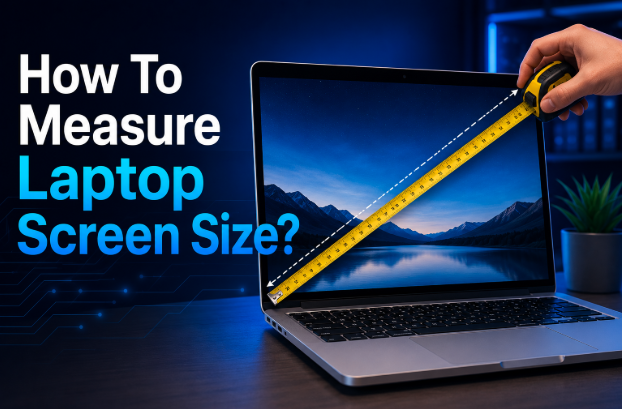
Laptop screen size refers to the diagonal measurement of the visible display area. The measurement starts from one corner of the screen and extends diagonally to the opposite corner.
Unlike television dimensions or physical laptop measurements, screen size does not refer to the width or height of the device. Instead, it focuses solely on the display panel.
For example:
| Screen Size | Diagonal Measurement |
|---|---|
| 13.3 inches | 13.3-inch diagonal display |
| 14 inches | 14-inch diagonal display |
| 15.6 inches | 15.6-inch diagonal display |
| 16 inches | 16-inch diagonal display |
| 17.3 inches | 17.3-inch diagonal display |
This standardized measurement method helps consumers compare different laptops regardless of brand or design.
Tools Needed to Measure a Laptop Screen
Before learning how to measure laptop screen size, gather a few basic tools.
The most common tool is a measuring tape. A flexible measuring tape is ideal because it can easily align with the screen corners. A standard ruler can also work if the screen is smaller.
Useful tools include:
- Measuring tape
- Ruler
- Notebook for recording measurements
- Calculator (optional)
Most people already have these items at home, making the process quick and convenient.
How to Measure Laptop Screen Size Correctly
Understanding how to measure laptop screen size correctly is essential because even a small error can lead to buying incompatible accessories or replacement parts.
Follow these simple steps:
Step 1: Open the Laptop Fully
Place the laptop on a flat surface and open the screen completely. Ensure that the display is stable and easy to access.
Step 2: Identify the Display Area
Look carefully at the screen. You should measure only the visible display area, not the plastic or metal border surrounding it.
The border around the display is called the bezel. Including the bezel will produce inaccurate measurements.
Step 3: Measure Diagonally
Place the measuring tape at the bottom-left corner of the display area.
Stretch the tape diagonally to the top-right corner of the display area.
Always measure from display corner to display corner.
Step 4: Record the Measurement
Write down the measurement in inches.
For example:
- 13.3 inches = 13.3-inch laptop
- 14 inches = 14-inch laptop
- 15.6 inches = 15.6-inch laptop
- 17.3 inches = 17.3-inch laptop
This diagonal measurement represents the official screen size.
Understanding Laptop Screen Size Standards
Laptop manufacturers produce devices in several standard screen sizes. Each size serves different user needs.
Small Screens (11 to 13 Inches)
Small laptops are highly portable and lightweight. They are popular among students, travelers, and professionals who frequently work on the move.
Advantages include:
- Easy portability
- Lower weight
- Better battery efficiency
However, smaller screens may feel cramped for multitasking.
Medium Screens (14 to 15.6 Inches)
This category is the most popular among consumers.
A 14-inch or 15.6-inch laptop offers a balance between portability and usability. These laptops are suitable for office work, web browsing, content creation, and entertainment.
Large Screens (16 to 17.3 Inches)
Large-screen laptops provide more workspace and enhanced viewing experiences.
They are often preferred by:
- Gamers
- Video editors
- Graphic designers
- Engineers
The main drawback is reduced portability due to increased size and weight.
Difference Between Screen Size and Laptop Dimensions
One of the most common misunderstandings when learning how to measure laptop screen size is confusing screen size with laptop dimensions.
These are two different measurements.
| Measurement Type | Description |
| Screen Size | Diagonal measurement of display area |
| Laptop Width | Physical width of the entire device |
| Laptop Height | Physical height of the device |
| Laptop Thickness | Depth of the device |
For example, two laptops may both have a 15.6-inch screen but different overall dimensions.
Modern laptops often feature thinner bezels, allowing manufacturers to fit larger screens into smaller bodies.
As a result, a modern 15.6-inch laptop may be physically smaller than an older 15.6-inch model.
How to Find Laptop Screen Size Without Measuring
Sometimes measuring tools are unavailable. Fortunately, there are alternative methods.
Check the Manufacturer’s Specifications
Most laptop manufacturers publish detailed specifications on their websites.
You can search using the laptop model number to find exact screen information.
Examine the Laptop Model Number
Many laptop model numbers include clues about display size.
For example, some manufacturers incorporate screen size indicators directly into product names.
Check System Information
Windows users can often identify their display specifications through system settings or device information software.
Review Purchase Documentation
Original packaging, receipts, invoices, and product manuals often list screen size information.
These methods can help confirm measurements without physically measuring the display.
Measuring Laptop Screen Width and Height
Although screen size is measured diagonally, there are situations where width and height measurements are needed.
For example:
- Ordering replacement displays
- Purchasing screen protectors
- Custom mounting solutions
To measure width, place the ruler horizontally across the display area.
To measure height, place the ruler vertically across the display area.
Here are approximate dimensions for common screen sizes:
| Screen Size | Approximate Width | Approximate Height |
| 13.3 inches | 11.6 inches | 6.5 inches |
| 14 inches | 12.2 inches | 6.9 inches |
| 15.6 inches | 13.6 inches | 7.6 inches |
| 17.3 inches | 15.1 inches | 8.5 inches |
These dimensions may vary depending on aspect ratio.
Laptop Screen Aspect Ratios Explained
Aspect ratio refers to the relationship between screen width and height.
Modern laptops use different aspect ratios depending on their intended purpose.
16:9 Aspect Ratio
This is the most common laptop aspect ratio.
It is ideal for:
- Watching movies
- Streaming content
- Gaming
Most traditional laptops use this format.
16:10 Aspect Ratio
The 16:10 ratio provides additional vertical screen space.
Benefits include:
- Better productivity
- Easier document editing
- Improved web browsing
Many premium laptops now use this format.
3:2 Aspect Ratio
The 3:2 ratio is becoming increasingly popular among professionals.
It offers a taller display, making it useful for:
- Writing
- Programming
- Reading documents
Understanding aspect ratios helps explain why two screens with identical diagonal measurements can have different widths and heights.
Why Knowing Your Laptop Screen Size Is Important
Many purchasing decisions depend on accurate screen measurements.
Knowing how to measure laptop screen size can help when buying:
- Replacement screens
- Laptop bags
- Sleeves
- Screen protectors
- Privacy filters
- External accessories
Accurate measurements also prevent compatibility issues.
For example, a sleeve designed for a 14-inch laptop may not fit a 15.6-inch device properly.
Similarly, ordering the wrong replacement screen can result in wasted money and installation difficulties.
Understanding screen size also helps users compare laptop models more effectively before making a purchase.
Common Mistakes When Measuring Laptop Screens
Even though measuring a laptop screen is simple, many people make errors that lead to incorrect results.
The most common mistake is including the bezel in the measurement. Only the display area should be measured.
Another frequent error is measuring horizontally rather than diagonally. Laptop screen size is always measured diagonally.
Some users measure the entire laptop body instead of the screen itself. This produces significantly larger measurements that do not represent the actual display size.
Incorrect unit conversion can also cause confusion. Always record measurements in inches because laptop manufacturers use inches as the standard measurement unit.
Finally, rounding measurements too aggressively can lead to mistakes. For example, a 15.6-inch screen should not simply be called 16 inches when ordering replacement parts.
Conclusion
Learning how to measure laptop screen size is a simple but valuable skill. By measuring the visible display diagonally from one corner to the opposite corner, you can quickly determine the correct screen size of your laptop.
Whether you are purchasing accessories, replacing a damaged display, or comparing laptop models, accurate measurements ensure better compatibility and smarter buying decisions. Remember to measure only the display area, avoid including the bezel, and always use diagonal measurements in inches.
With the knowledge provided in this guide, you can confidently identify your laptop screen size and avoid the common mistakes that often lead to confusion.
Frequently Asked Questions (FAQs)
Do I measure the bezel when measuring a laptop screen?
No. Only the visible display area should be measured. The bezel or frame surrounding the screen should not be included.
How can I tell if my laptop is 15.6 inches or 14 inches?
Measure the screen diagonally from one display corner to the opposite display corner. The resulting measurement will reveal the actual screen size.
Can I find my laptop screen size online?
Yes. You can search for your laptop model number on the manufacturer’s website and review the official specifications.
Why are laptop screens measured diagonally?
Diagonal measurement provides a standardized method that allows easy comparison between screens of different shapes and aspect ratios.
What is the most common laptop screen size?
The 15.6-inch screen remains one of the most popular laptop sizes because it balances portability and usability.
Does screen size affect laptop performance?
Screen size itself does not directly affect performance. However, larger screens may require more powerful graphics hardware when operating at higher resolutions.
Related Articles
Bulldog Tech Echo: Complete Guide to the Digital Learning Platform
Web Innovation SeveredBytes: A Complete Guide to Modern Technology, and Web Development
Custom PCB Design RadioCord Technologies: Complete Guide to PCB Development Services
Revolutionary Navigation Technology Astradia: The Future of GPS-Independent Aircraft Navigation
Autonomous Vehicle Localization Technology Mapping Navigation: A Complete Guide